

Release 0.14.0
This release contains several highly requested features and improvements. Ignore the topics you never wanted to be backed up, hit pause or resume on that long-running restore, and finally stop losing your consumer groups during cluster migrations. That last one? We built a whole new tool for it.
Installation
Section titled “Installation”For new installations, see the Installation guide.
For upgrading existing installations, see the associated Upgrading to 0.14.x guide.
Reset your consumer groups with Kannika Bridge
Section titled “Reset your consumer groups with Kannika Bridge”We are excited to announce the first preview version of Kannika Bridge, a new tool for migrating consumer groups between Kafka clusters. Kannika Bridge is available from GitHub at https://github.com/kannika-io/kbridge.
Restoring Kafka topics from a backup usually solves only half the disaster recovery puzzle. While your data might be back on the new cluster, your consumer groups are effectively lost in space. Standard Kafka migration workflows force consumers to start from either the very beginning of a topic or the very end. This creates a massive headache where you either double-process months of historical data or skip over critical messages that were in flight during the cutover.
Up until now, fixing this meant engineers had to manually calculate and reset offsets for every single partition across every consumer group. It was a tedious, manual process involving brittle custom scripts or clunky third-party tools that rarely played nice with restored data.
With Kannika Bridge,
this process can be easily automated.
By leveraging a Restore’s legacy offset header feature,
kbridge maps original offsets to their new positions on the target cluster.
This is an early preview release, and we welcome feedback from the community. We plan to expand Kannika Bridge’s capabilities in future releases, and to integrate it more closely into Kannika Armory’s workflows, making consumer group migrations even smoother.
Exclude topics from backups
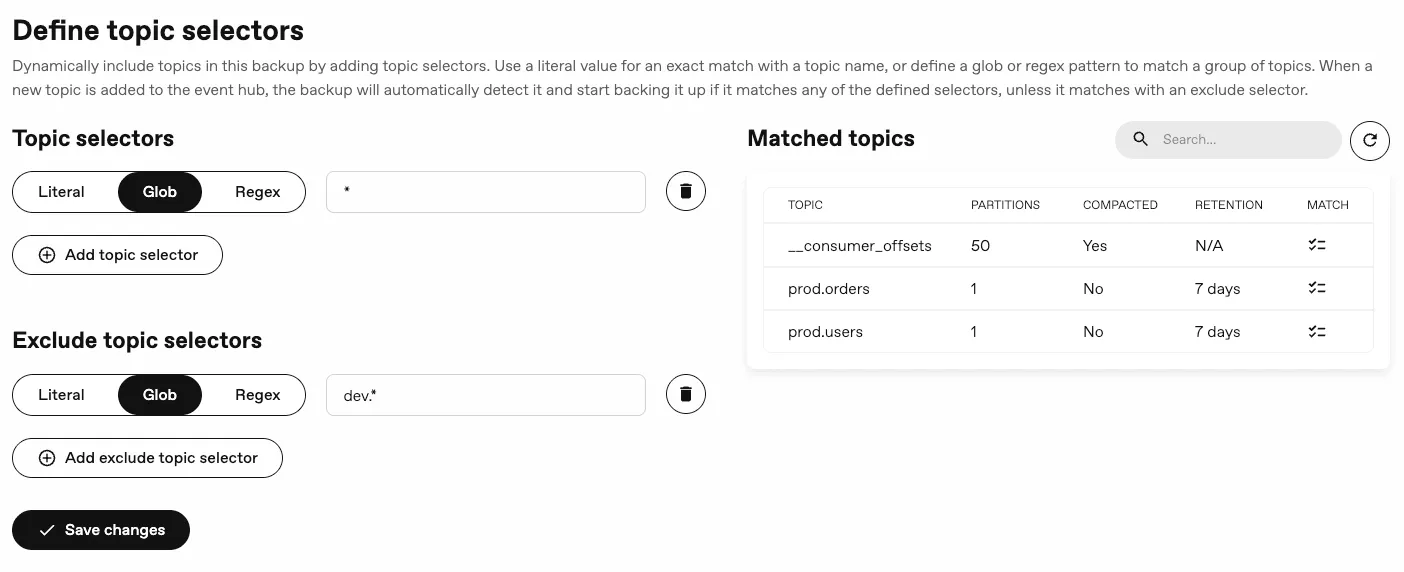
Section titled “Exclude topics from backups”You now have more granular control over which topics are included in your backups, as you can exclude specific topics using exclusion topic selectors, allowing you to ignore topics that you don’t want to back up. It accepts the same matcher types as the inclusion selectors, allowing you to specify topics to be excluded based on exact names or patterns.
In addition, the console will show which topics match your selectors, making it easier to verify your backup configuration.
Pause and resume restores
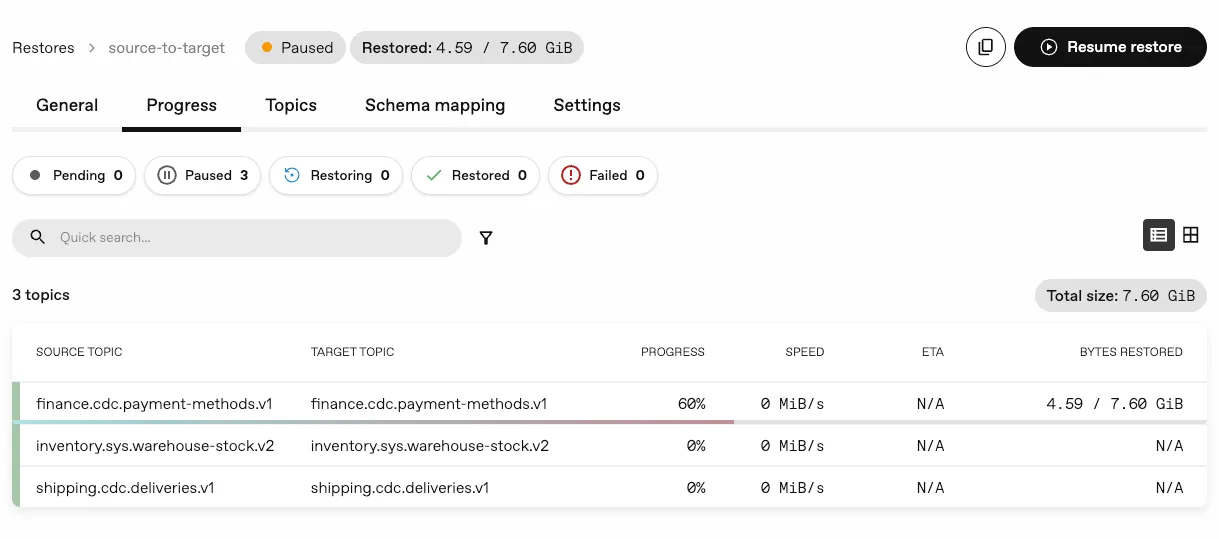
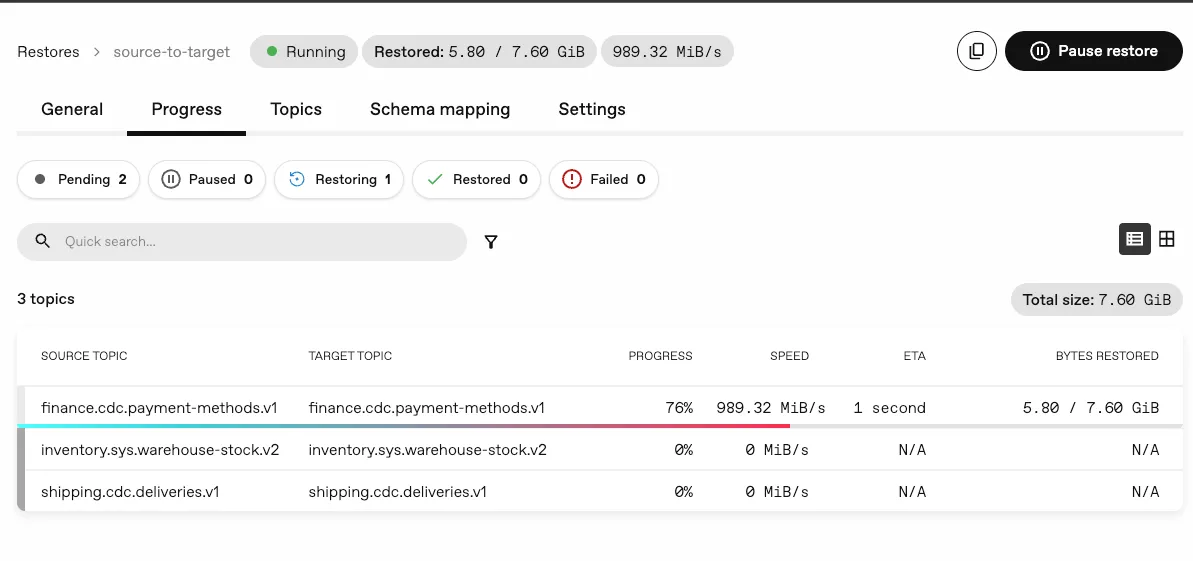
Section titled “Pause and resume restores”We’ve introduced the ability to pause and resume a Restore while it is in progress. This allows you to temporarily halt a restore operation without losing progress, and then resume it at a later time when it’s more convenient.
In case of pod interruptions, such as node evictions, the restore can also be resumed from where it left off.
Restore lifecycle updates
Section titled “Restore lifecycle updates”To accommodate the new pause and resume functionality,
we have introduced new Paused and Interrupted states to the Restore status.
In addition, we have extended the conditions to provide more detailed information about the restore process.
This includes a new PodCompleted condition to track the Pod status.
Example of a completed restore
kind: Restore# ...status: message: Done completionTime: "2024-01-15T11:00:00Z" startTime: "2024-01-15T10:30:00Z" conditions: - type: ConfigurationValid status: "True" reason: ValidConfiguration message: The restore configuration is valid lastTransitionTime: "2024-01-15T10:30:00Z" observedGeneration: 3 - type: RestoreCompleted status: "True" reason: Done message: The restore completed successfully lastTransitionTime: "2024-01-15T11:00:00Z" observedGeneration: 3 - type: JobCompleted status: "True" reason: JobSucceeded message: The job completed successfully lastTransitionTime: "2024-01-15T11:00:00Z" observedGeneration: 3 - type: PodCompleted status: "True" reason: PodSucceeded message: The pod completed successfully lastTransitionTime: "2024-01-15T11:00:00Z" observedGeneration: 3Example of an interrupted restore
kind: Restore# ...status: message: Done completionTime: "2024-01-15T11:00:00Z" startTime: "2024-01-15T10:30:00Z" conditions: - type: ConfigurationValid status: "True" reason: ValidConfiguration message: The restore configuration is valid lastTransitionTime: "2024-01-15T10:30:00Z" observedGeneration: 3 - type: RestoreCompleted status: "True" reason: Done message: The restore completed successfully lastTransitionTime: "2024-01-15T11:00:00Z" observedGeneration: 3 - type: JobCompleted status: "True" reason: JobSucceeded message: The job completed successfully lastTransitionTime: "2024-01-15T11:00:00Z" observedGeneration: 3 - type: PodCompleted status: "True" reason: PodSucceeded message: The pod completed successfully lastTransitionTime: "2024-01-15T11:00:00Z" observedGeneration: 3For more information about these states and the overall restore lifecycle, please check out our new Restore Lifecycle documentation.
mTLS support for schema registries
Section titled “mTLS support for schema registries”We added support for connecting securely to schema registries that require custom trust anchors or client-side identity verification. This allows you to provide custom root certificates for private CAs and configure client authentication to meet strict mutual TLS requirements.
The mTLS configuration can be specified in the (Confluent) SchemaRegistry resource, where you can provide the necessary certificates and keys for authentication.
apiVersion: kannika.io/v1alphakind: SchemaRegistrymetadata: name: confluent-registryspec: confluent: url: https://somewhere.out.there # Optional. The presence of sslConf decides whether TLS is used: # (omitted) -> no TLS # sslConf: null -> no TLS # sslConf: {} -> TLS sslConf: # Optional. Defaults to true, so `sslConf: {}` already enables TLS. # Set to false to turn TLS off while keeping the rest of sslConf. enabled: true # Optional. Configure an explicit CA for server authentication. caCertificatePemFrom: secretKeyRef: name: tls-secret key: ca.crt # Optional. Set a client certificate if the server requires it. certificatePemFrom: secretKeyRef: name: tls-secret key: tls.crt # Optional. Set a client key if the server requires it. PKCS#8 only. privateKeyPemFrom: secretKeyRef: name: tls-secret key: tls.key # Optional. Set the password to unlock the client's private key privateKeyPasswordFrom: secretKeyRef: name: tls-key-password key: passwordNew tutorials
Section titled “New tutorials”We have added new tutorials to help you get started with common use cases. Tutorials include step-by-step instructions and example Kubernetes resources. Each tutorial is accompanied by a one-click setup script from our new examples repository, available at https://github.com/kannika-io/armory-examples. We’ll be continuously adding more tutorials in the coming months.
Other changes
Section titled “Other changes”-
Console: Improved accessibility of confirm dialogs by adding keyboard support.
-
Console: Added ability to create restore from backup details page.
Bug fixes
Section titled “Bug fixes”- Operator: Fixed observed generation not being set on the JobCompleted condition.
Breaking changes
Section titled “Breaking changes”- Restore: The status has been updated to include new states for tracking paused and interrupted states. This may require updates to any custom tooling or scripts that interact with the Restore status.
Release Notes
Section titled “Release Notes”For a full list of changes, see the Changelog.